LoRA vs QLoRA: The Ultimate Memory Bottleneck Showdown
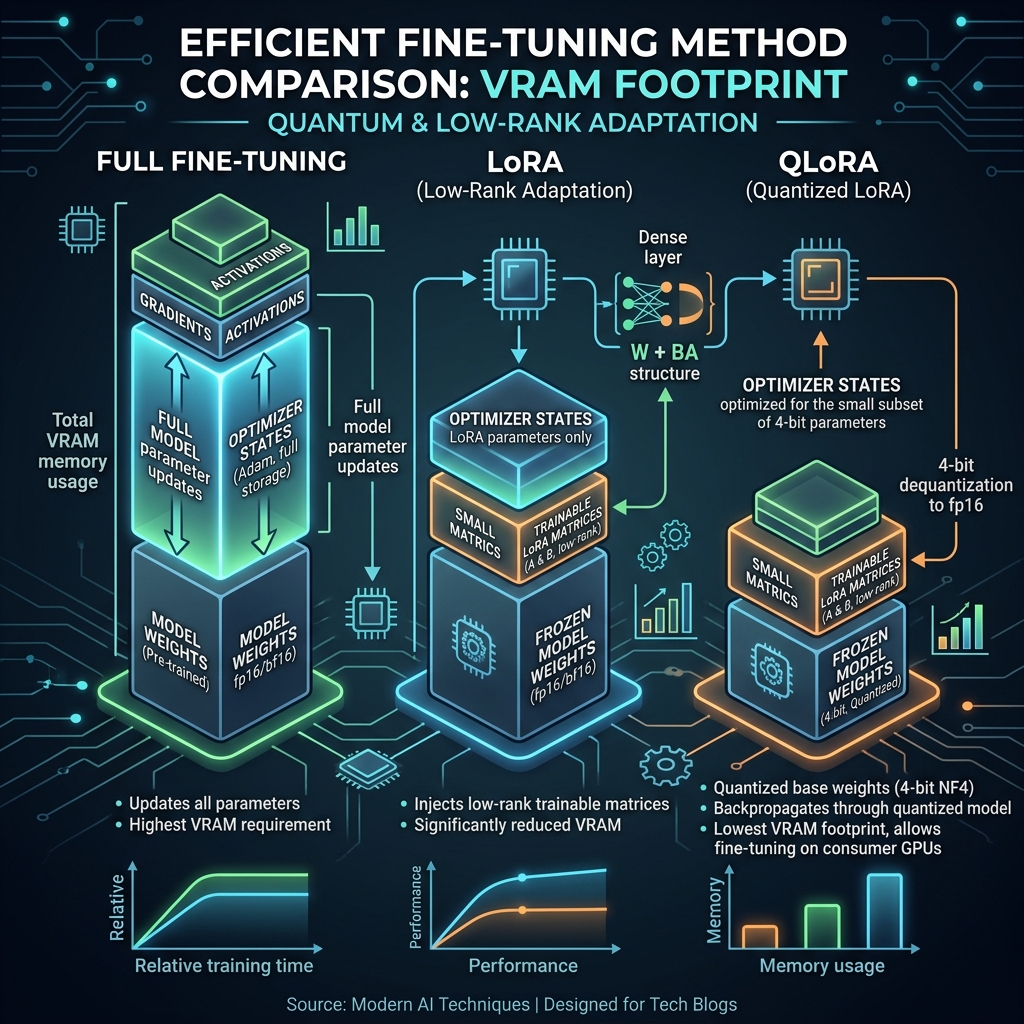
To truly understand the difference between LoRA and QLoRA, we need to look at the exact bottlenecks they solve in Deep Learning.
Since you are already familiar with the mechanics of Quantization and Distributed Data Parallel (DDP), you know that training a massive model is a battle against memory. When fine-tuning a Large Language Model (LLM) with billions of parameters, the problem isn't just the size of the model—it's the massive overhead of Optimizer States and Gradients during backpropagation.
Here is the deep dive into how LoRA and QLoRA tackle this, evolving from a mathematical trick to a hardware-saving masterpiece.
1. The Baseline: Why Full Fine-Tuning is a Nightmare
Imagine you have a 7-Billion parameter model (like LLaMA-2 7B).
- Model Weights (FP16): 14 GB of VRAM.
- Gradients (FP16): 14 GB of VRAM.
- Adam Optimizer States (FP32): 28 GB of VRAM (Adam stores two momentum variables per parameter).
- Total VRAM needed: ~56 GB.
You would need an expensive A100 (80GB) GPU just to fine-tune a relatively "small" 7B model.
2. LoRA (Low-Rank Adaptation): The Parameter Reducer
The Core Idea: Instead of updating the massive pre-trained weight matrix, freeze it. Then, inject a tiny "bypass" network that learns the new task.
The Math: Let’s say a specific attention layer in the LLM has a weight matrix with dimensions (e.g., ). Updating directly means updating 16.7 million parameters.
LoRA freezes and adds two small trainable matrices, and :
- has dimensions
- has dimensions
- (Rank) is a very small number (e.g., ).
If , matrix is and is . Total trainable parameters = . You just reduced the trainable parameters in this layer by 99.6%!
The Result of LoRA: Because you are only training and , your Optimizer States and Gradients shrink to almost zero.
- Base Model (FP16): 14 GB.
- LoRA Weights + Optimizer: ~1 GB.
- Total VRAM: ~15 GB.
The Flaw in LoRA: LoRA fixes the optimizer memory problem, but you still have to load the original 14GB base model into VRAM in 16-bit precision. If you want to train a 70B model, just loading the base weights takes 140GB, which is still impossible on consumer hardware.
3. QLoRA (Quantized LoRA): The VRAM Savior
The Core Idea: QLoRA pushes the limits of what you already know about Quantization. It says: "If we freeze the base model anyway, why keep it in 16-bit? Let's crush it down to 4-bit, and only keep the tiny LoRA matrices in 16-bit!"
The Mechanics of QLoRA:
- 4-bit NormalFloat (NF4): Instead of standard INT4 quantization, QLoRA introduces NF4. It assumes the weights of pre-trained neural networks follow a normal (Gaussian) distribution and optimizes the 4-bit bins specifically for that shape, preserving much higher accuracy.
- Double Quantization: It takes the quantization constants (the and scales we discussed previously) and quantizes them again from 32-bit to 8-bit, saving an extra 0.37 GB per 65B parameters.
- Paged Optimizers: If the GPU VRAM gets full during a sudden memory spike, QLoRA temporarily pages the optimizer states to the standard CPU RAM, preventing an Out-Of-Memory (OOM) crash.
The Forward Pass: During training, the math looks like this: The massive matrix sits in VRAM taking up almost no space. When a batch of data arrives, it quickly dequantizes to 16-bit in the GPU registers, performs the multiplication, and drops back to 4-bit.
The Result of QLoRA:
- Base Model (4-bit NF4): ~3.5 GB.
- LoRA Weights + Optimizer: ~1 GB.
- Total VRAM: ~4.5 GB.
Suddenly, you can fine-tune a 7B LLM on a standard gaming laptop with an RTX 3060 (6GB VRAM)!
Summary Comparison Table
| Feature | Full Fine-Tuning | LoRA | QLoRA |
|---|---|---|---|
| Trainable Parameters | 100% | ~0.1% to 1% | ~0.1% to 1% |
| Base Model Precision | 16-bit / 32-bit | 16-bit | 4-bit (NF4) |
| Adapter Precision | N/A | 16-bit / 32-bit | 16-bit / 32-bit |
| Memory Bottleneck Solved | None | Optimizer & Gradients | Base Weights, Optimizer & Gradients |
| Inference Speed | Very Fast | Very Fast (mergeable) | Slightly slower (due to dequantization) |
Related Articles
Scaling in Transformer Architectures: The Mathematical Rationale behind $\sqrt{d_k}$
2026-04-10
Scientific ResearchUnderstanding the Context Window: The Short-Term Memory of LLMs
2026-04-10
Scientific ResearchMulti-Head Attention: The Engine of Parallel Representation in Transformers
2026-04-10